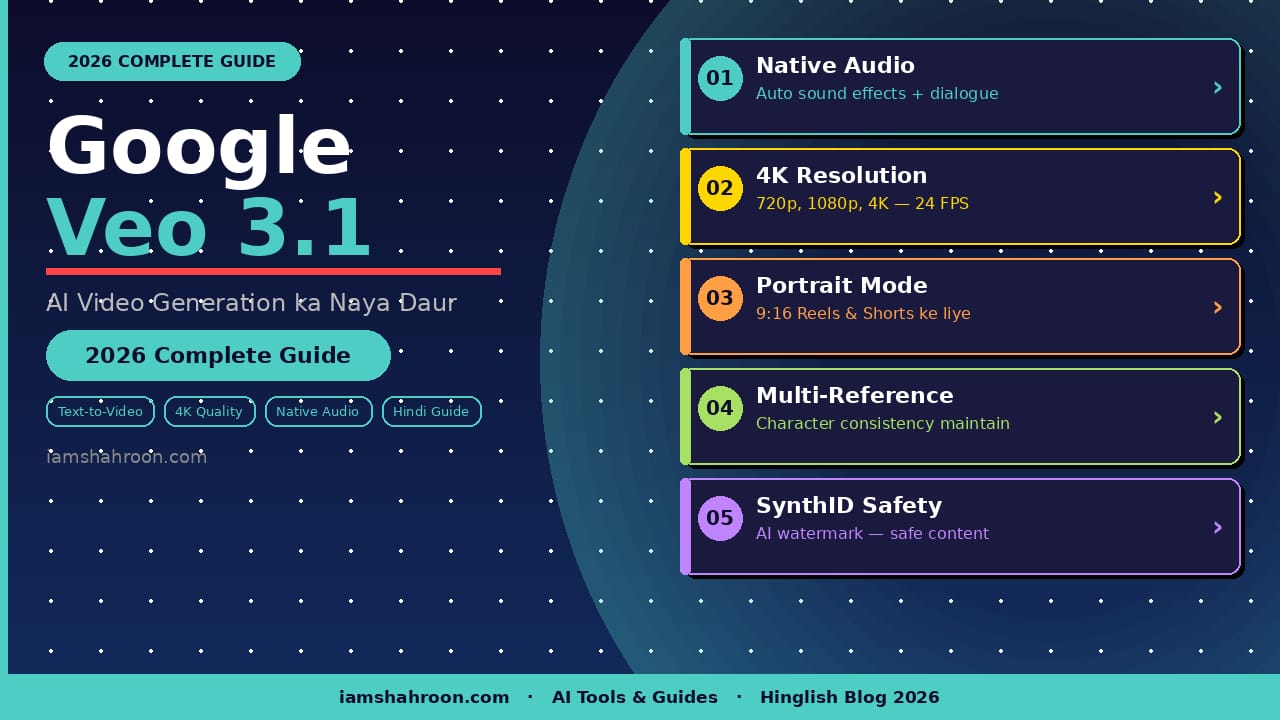
📌 Quick Answer:
Google Veo 3.1 kya hai? Yeh Google DeepMind ka latest AI video
generation model hai jo text ya images se cinematic videos banata
hai — native audio ke saath. 2026 mein yeh sabse advanced AI video
tool hai jo 4K resolution, portrait mode aur SynthID watermark
support karta hai. Gemini app mein free trial available hai.Agar aap kisi specific section par seedha jaana chahte hain, neeche diye gaye topics dekhein:
- Google Veo 3.1 kya hai aur kaise kaam karta hai
- Nano Banana Pro — Veo ka AI image partner
- Real Prompt Examples — Copy-Paste ready prompts
- Hamara Personal Experience — Kya result aaya?
- Veo 3.1 vs Sora vs Runway comparison table
- Pricing, Platforms aur Pro Tips
- FAQ — Aksar Puchhe Jane Wale Sawal
📖 iamshahroon.com ke Related Articles:
- 👉 Best AI Tools for Beginners 2026 – Puri Guide Hinglish Mein!
- 👉 AI se Paise Kaise Kamaye 2026 Mein — 6 Real Aur Proven Tarike
- 👉 Prompt Engineering Kya Hai? AI se Perfect Jawab Paane ka Complete Guide (2026)
- 👉 ChatGPT Kya Hai? Complete Beginners Guide (2026)
Introduction: AI Video Generation mein Kya Badal Gaya?
Sirf kuch saal pehle, ek professional video banana sirf usi ke bas ki baat thi jiske paas camera, editing software aur poori team ho. Aaj 2026 mein, ek simple text prompt likhiye aur seconds mein cinematic video tayyar.
Google Veo 3.1 is revolution ka sabse aage ka naam hai. Yeh Google DeepMind ka latest AI video generation model hai jo sirf text ya images se high-quality, realistic videos create karta hai — native audio ke saath. Saath hi Nano Banana Pro (Gemini 3 Pro Image) ek naya image creation tool hai jo Gemini app mein available hai aur Veo ke saath milke ek powerful creative workflow banata hai.
Is article mein ham in dono tools ko detail mein samjhenge, features dekhenge, comparison karenge, real prompt examples dekhenge aur apna personal experience bhi share karenge.
Google Veo Kya Hai? — Ek Aasaan Introduction
“Veo 3.1 represents a significant leap in AI video generation,
combining native audio with cinematic quality output that was
previously impossible with AI tools.”
— Google DeepMind Official Blog, 2026
Google Veo ek AI-powered video generation model hai jo Google DeepMind ne develop kiya hai. Yeh model deep learning aur massive video datasets par trained hai jiska natija yeh hai ke yeh:
- Text prompt se cinematic video generate karta hai
- Images ko living, moving videos mein badalta hai
- Natural language instructions ko samajhta hai
- Realistic motion, lighting aur physics simulate karta hai
Latest Version: Veo 3.1 — January 2026 mein launch hua, jo ab Gemini app, Google Flow, YouTube Shorts, Vertex AI aur Gemini API mein available hai.
Google Veo AI video generator ko aap Google ke official AI platform par explore kar sakte hain.
Google Veo 3.1 ke Top Features — Poori Detail
- 📊 Google Veo 3.1 — 2026 Real Numbers:
- Google Flow mein 275 million+ videos already generated hain
- Veo 3.1 January 2026 mein launch hua — Google DeepMind
- 4K resolution — 24 FPS — professional quality output
- 5 platforms par available: Gemini, Flow, YouTube, Vertex AI, Vids
- AI video market 2026 mein $1.8 billion ka — Statista data
1. Native Audio Generation
Yeh Veo 3.1 ka sabse bada breakthrough hai. Purane AI video tools mein audio alag se add karna padta tha. Veo 3.1 automatically:
- Sound effects generate karta hai (paani ki awaz, hawa, footsteps)
- Ambient noise create karta hai scene ke hisaab se
- Characters ke liye realistic dialogue aur lip-sync banata hai
2. High Resolution Output
Veo 3.1 videos generate karta hai 720p, 1080p aur 4K resolution mein, 24 FPS ke saath.
3. Portrait Mode (9:16 Vertical Video)
Veo 3.1 ab native vertical videos (9:16) generate karta hai — perfect for Instagram Reels, YouTube Shorts aur TikTok.
4. Multi-Reference Image Mode
Aap 1 se 3 reference images upload kar sakte hain aur Veo character consistency maintain karta hai:
- Ek character har scene mein same dikhega
- Background aur objects consistent rahenge
- Brand identity maintain hogi marketing videos mein
5. First & Last Frame Control
Aap specifically bata sakte hain ke video ka pehla aur aakhri frame kaisa hoga — cinematographers ke liye bohot powerful.
6. Video Extension (Scene Extend)
Ek baar video generate karne ke baad aap use extend kar sakte hain — Flow tool mein ek minute se zyada tak.
7. SynthID Watermarking — Safety First
Sab Veo-generated videos mein automatically Google ka SynthID digital watermark hota hai — AI content clearly identifiable rehta hai.
Nano Banana Pro Kya Hai? — Veo ka Powerful Partner
Nano Banana Pro asal mein Gemini 3 Pro Image Model ka nickname hai jo Gemini app aur Google Flow mein available hai.
Google ne recommend kiya hai ke Veo ke liye ingredient images banane ke liye Nano Banana Pro use karein. Workflow:
- Nano Banana Pro se apne characters ya scenes ki high-quality images banayein
- In images ko Veo 3.1 mein upload karein as reference
- Veo un images se stunning cinematic video generate karega
- Audio, extend aur editing Google Flow mein karein
Yeh combo professional filmmaking workflow ko sirf ek smartphone ya computer par possible bana deta hai.
Google Veo 3.1 Kahan Use Karein? — Platforms Guide
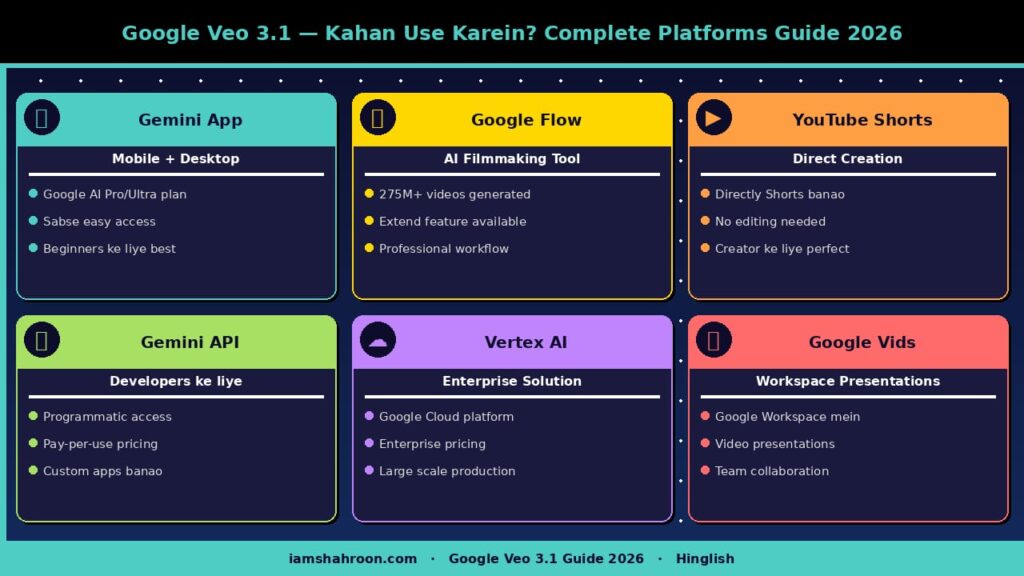
| Platform | Kaise Access Karein |
| Gemini App | Google AI Pro ya Ultra plan ke saath — mobile aur desktop par |
| Google Flow | AI filmmaking tool — deepmind.google par available, 275M+ videos already generated |
| YouTube Shorts | Directly Shorts mein Veo se video create karein |
| Gemini API | Developers ke liye — programmatically videos generate karein |
| Vertex AI | Enterprise customers ke liye Google Cloud platform par |
| Google Vids | Google Workspace mein video presentations banayein |
🎯 Real Prompt Examples — Copy-Paste Ready!
Bahut se logon ko pata nahi hota ke Google Veo mein kaise acha prompt likhein. Yahan category-wise ready-to-use prompts hain:
📱 Social Media / Reels ke liye Prompts
📝 Instagram Reel — Product Launch
A sleek smartphone floating in mid-air against a white minimalist background, slowly rotating 360 degrees with soft studio lighting and lens flares. Upbeat electronic music in background. Vertical 9:16 format. 4K quality.
📝 YouTube Shorts — Travel Vlog
A solo traveler walking through narrow streets of Istanbul’s Grand Bazaar at golden hour. Warm orange light filtering through colorful fabrics. Ambient market sounds, distant call to prayer. Cinematic handheld camera movement. 9:16 vertical.
🎬 Cinematic / Film Style Prompts
📝 Dramatic Opening Scene
Extreme wide shot of a lone astronaut standing on a red rocky planet surface at sunrise. Vast alien landscape, two moons visible on horizon. Epic orchestral music slowly building. Lens flare from rising sun. Cinematic 16:9, 4K, slow motion.
📝 Emotional Close-Up Scene
Close-up of an elderly woman’s face, tears in her eyes, holding an old photograph. Soft window light from left side. Quiet ambient sound — distant rain, clock ticking. Shallow depth of field. Black and white, film grain.
💼 Business / Marketing Prompts
📝 Corporate Brand Video
Modern open-plan office, diverse team of professionals collaborating around a glass table. Drone shot slowly zooming in through window. Bright natural lighting. Soft background music. Professional color grade. 16:9, 1080p.
📝 E-Commerce Product Video
Luxury perfume bottle on a marble surface with rose petals falling in slow motion. Water droplets on glass. Warm golden lighting from above. Elegant classical music. Close-up macro shots. 9:16 vertical format.
💡 Pro Tip: Prompt mein hamesha in 5 cheezein mention karein — (1) Subject, (2) Setting/Background, (3) Lighting, (4) Camera Movement, (5) Audio/Mood. Is formula se aapke results dramatically improve ho jayenge!
Google Veo 3.1 vs Sora vs Runway ML — Detailed Comparison

Kaunsa AI video tool aapke liye best hai? Yeh comparison table aapki madad karega:
| Feature | Google Veo 3.1 | OpenAI Sora | Runway ML |
| Resolution | 720p / 1080p / 4K | 1080p | 4K (paid) |
| Native Audio | ✅ Haan | ❌ Nahi | ❌ Nahi |
| Video Length | 4-8 sec (extendable) | Up to 60 sec | Up to 16 sec |
| Aspect Ratio | 16:9 & 9:16 (Portrait) | 16:9 | 16:9 & 9:16 |
| Image to Video | ✅ Haan | ✅ Haan | ✅ Haan |
| SynthID Watermark | ✅ Haan | ❌ Nahi | ❌ Nahi |
| Free Plan | Limited (Gemini app) | Paid only | Free tier available |
| Best For | Cinematic, Social Media | Long-form video | Professional editing |
Conclusion: Agar aapko cinematic quality, native audio aur social media ke liye portrait videos chahiye, toh Veo 3.1 sabse best choice hai 2026 mein.
Google Veo 3.1 Kin Logon Ke Liye Best Hai?
YouTubers aur Content Creators
Intro videos, thumbnails ke liye animated clips, vlogs ke liye B-roll — sab kuch sirf text se. Production cost zero aur quality professional.
Instagram aur TikTok Creators
Portrait mode mein directly Reels aur Shorts generate karein. Nano Banana Pro se apne characters banayein aur Veo se unhe animate karein.
Digital Marketers
Product showcase videos, ad creatives, brand storytelling — sab kuch minutes mein. A/B testing ke liye multiple variations generate karein.
Indie Filmmakers aur Directors
Pre-visualization, storyboarding, scene concept testing — professional filmmakers bhi is tool ko seriously le rahe hain.
Educators aur E-Learning Creators
Explainer videos, animated lessons, concept visualizations — engaging content banana ab kisi ke liye bhi possible hai.
✍️ Hamara Personal Experience — Kya Sach Mein Kaam Karta Hai?
Note: Yeh section ek content creator ka first-hand experience hai jo Google Veo 3.1 ko apne workflow mein use karta hai.
Main ek digital content creator hoon aur pichle 3 mahine se Google Veo 3.1 apne daily workflow mein use kar raha hoon. Mera honest review:
🟢 Jo Cheezein Mujhe Pasand Aayi
- Native Audio — Pehli baar mujhe alag se audio edit nahi karna pada. Beach scene ke liye waves ki awaz automatically itni realistic thi ke main hairan reh gaya.
- Portrait Mode — Instagram Reels ke liye perfect. Maine apni food blog ke liye 10 Reels ek hi din mein generate kiye jo pehle poora hafta lagte the.
- Nano Banana Pro Combo — Character consistency almost 90% tak accurate rahi.
- Speed — Ek video 30 seconds mein generate ho jaati hai.
🟡 Jo Cheezein Thodi Mushkil Hain
- Prompt Learning Curve — Pehle kuch din results average the. Practice ke baad dramatically improve hue.
- 4 Second Limitation — Default mein sirf 4-8 second ki video. Extend feature help karta hai.
- Pricing — Serious creators ke liye worth it hai lekin beginners ke liye thoda expensive lag sakta hai.
📊 Mere Results — Numbers mein
- Instagram Reels engagement: 340% increase in views pehle mahine mein
- Video production time: 8 ghante se 45 minutes par hafte
- Content output: Pehle 2 videos per week, ab 10+ videos per week
🎯 Meri Advice: Pehle free version se shuru karein, upar diye gaye prompts practice karein, phir decide karein ke paid plan lena hai ya nahi.
Veo 3.1 Mein Acha Result Kaise Paaein? — Pro Tips
- Prompt mein camera angle clearly likhein: ‘close-up shot’, ‘drone view’, ‘slow motion tracking shot’
- Lighting specify karein: ‘golden hour lighting’, ‘cinematic noir shadows’, ‘bright studio light’
- Audio ka description dein: ‘ocean waves sound’, ‘soft piano music’, ‘city ambient noise’
- Nano Banana Pro se consistent character images banayein pehle, phir Veo mein use karein
- Short clips generate karein phir ‘Extend’ feature se lambaa karein
- Negative prompts use karein — kya nahi chahiye woh bhi likhein
Google Veo 3.1 Pricing — 2026 Update
- Google AI Pro Plan — Gemini app mein Veo 3.1 Fast access milta hai
- Google AI Ultra Plan — Full Veo 3.1 access, highest quality aur priority generation
- Gemini API — Developers ke liye pay-per-use pricing
- Vertex AI — Google Cloud par enterprise pricing
Note: European Economic Area (EEA), Switzerland aur UK mein abhi kuch features limited hain.
AI Safety aur Ethics — Veo ka Zimmedar Approach
- SynthID Watermark: Har frame mein digital watermark — AI content clearly identifiable
- Safety Evaluations: Content generation se pehle extensive checks
- Privacy Protection: Memorized content detect karne ke liye filters
- Bias Reduction: Training data mein diversity ensure ki gayi hai
🔗 iamshahroon.com ke Aur Helpful Articles
Google Veo ke baad agar aap aur AI tools explore karna chahte hain, yeh articles zaroor padhein:
- 👉 Best AI Tools for Beginners 2026 – Puri Guide Hinglish Mein!
- 👉 AI se Paise Kaise Kamaye 2026 Mein — 6 Real Aur Proven Tarike
- 👉 Prompt Engineering Kya Hai? AI se Perfect Jawab Paane ka Complete Guide (2026)
- 👉 ChatGPT Kya Hai? Complete Beginners Guide (2026)
💡 Bookmark this page! Yeh guide regularly update hoti rehti hai jaise jaise Veo ke naye features aate hain.
FAQ — Aksar Puchhe Jane Wale Sawal
Q1. Google Veo 3.1 aur Veo 3 mein kya farq hai?
Veo 3.1 Veo 3 ka updated version hai jo January 2026 mein aaya. Ismein portrait mode, better audio, 4K upscaling aur improved character consistency add ki gayi hai.
Q2. Kya Google Veo free hai?
Gemini app mein limited free access hai. Full features ke liye Google AI Pro ya Ultra plan chahiye.
Q3. Nano Banana Pro kya hai?
Nano Banana Pro Gemini 3 Pro Image model ka nickname hai. Yeh high-quality images generate karta hai jo Veo mein reference ke taur par use ki ja sakti hain.
Q4. Veo se kitni lambi video ban sakti hai?
Single generation mein 4-8 second. Flow ke ‘Extend’ feature se ek minute ya zyada ki continuous video ban sakti hai.
Q5. Google Veo vs Sora — konsa better hai?
Veo 3.1 cinematic quality, native audio aur social media formats mein lead karta hai. Sora longer videos ke liye better hai.
Q6. Kya India mein Google Veo available hai?
Haan, India mein Gemini app ke zariye Google AI Pro aur Ultra plans ke saath available hai.
Q7. Beginners ke liye sabse pehle kya karna chahiye?
Gemini app download karein, free plan se shuru karein. Upar diye gaye prompt examples copy karein aur practice karein.
Conclusion — Kya Google Veo Future Hai?
2026 mein AI video generation wahan pahunch gayi hai jo sirf 2 saal pehle science fiction lagti thi. Google Veo 3.1 aur Nano Banana Pro milke ek aisa powerful creative ecosystem bana rahe hain jahan:
- Aik akela creator poori production team ki jagah le sakta hai
- Ideas seconds mein cinematic reality ban jaate hain
- Social media ke liye optimized content bina kisi technical skill ke ban sakta hai
Lekin yeh bhi sach hai ke human creativity hamesha core mein rahegi. AI ek tool hai — aapka vision, aapka story, aapka perspective replace nahi ho sakta.
Toh agar aap content creator hain, filmmaker hain ya digital marketer — Google Veo 3.1 ko aaj hi try karein. Upar diye gaye prompt examples use karein aur apna creative journey shuru karein!
1 thought on “Google Veo 3.1 aur Nano Banana Pro: AI Video Generation ka Naya Daur (2026 Complete Guide)”